
Feeling clumsy with a single desktop in Windows 7! There is a software app for Windows 7 called “Windows Pager” that will create 4 virtual desktops. (also called virtual workspaces). The latest changes to the new tool bring unlined integration into Windows 7.
Windows Pager sits perfectly in the Windows 7 taskbar (also called the superbar) with a complete preview of apps running in virtual desktops. You can reach the respective virtual desktop by clicking each icon.
You can switch the desktops by clicking the icons in the taskbar. The same can be obtained by right-clicking any Windows title bar and selecting the virtual desktops.
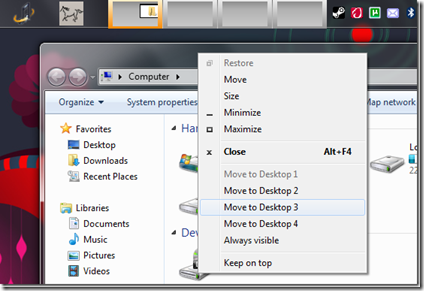
The preview of virtual desktops in the taskbar is live. You can see which windows are open in each desktop and where they are positioned. To test this feature, hold and move any window while watching the preview in the taskbar.
Download Windows Pager
You may need to register for the above forum if the download link is not working.
The software app works on Windows XP, Vista, and 7. Exe’s for both 32-bit and 64-bit OSs are available inside the zip file. The size of the portable app is 500 KB, and it can be run straight from the USB drive.
